Nginx sits in front of about a third of the web, and most of the configurations running in production were assembled from Stack Overflow answers by someone who needed TLS working before a demo. It usually works. Then one day a rewrite rule behaves strangely, or a location block matches the wrong request, or a security advisory lands and nobody is sure whether the config is affected.
This is a guide to actually understanding nginx: how the process model works, why location matching trips everyone, reverse proxying and caching done properly, rate limiting, TLS, the debugging techniques that save hours, and the state of the nginx world in 2026 - which has had an eventful year.
What nginx is, and why it won
Igor Sysoev released nginx in 2004 to solve the C10K problem - handling ten thousand concurrent connections on one machine. Apache's model at the time was a process or thread per connection, which meant memory usage scaled with concurrency and the machine fell over well before the network did.
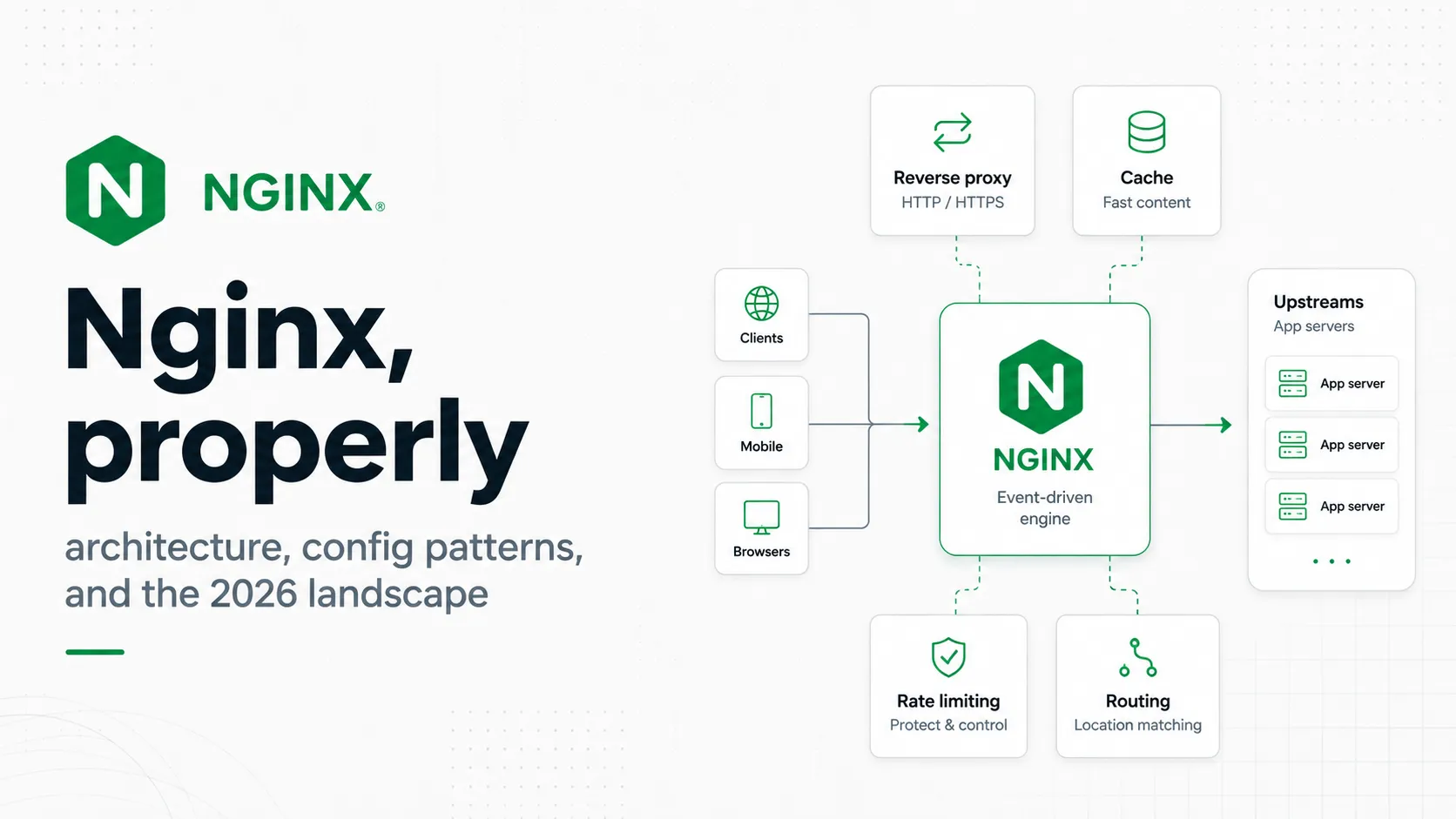
Nginx used an event loop instead. A small fixed number of worker processes, each handling thousands of connections through non-blocking I/O and an event notification mechanism like epoll or kqueue. Memory usage scales with worker count, not connection count. That single architectural decision is why nginx displaced Apache and why it still holds roughly a third of the market twenty years later.
The process model
master process        # reads config, binds ports, manages workers - runs as root
├── worker process    # handles connections - runs as an unprivileged user
├── worker process
├── worker process
├── worker process    # one per CPU core by default
├── cache manager     # evicts expired cache entries
└── cache loader # loads cache metadata at startup, then exitsnginx or www-data, which is why a worker compromise is less catastrophic than it could be.Workers do not share connections. Each accepts and handles its own, which means there is no shared-state locking on the hot path. The consequence you will notice in practice: anything that maintains counters across workers - rate limit zones, caches, connection limits - needs an explicitly declared shared memory zone.
Versions, and the numbering scheme people get wrong
Nginx maintains two branches, and the version numbers tell you which is which. An even second component means stable - 1.30.x. An odd second component means mainline - 1.31.x. This is the opposite of what many people assume from experience with other projects.
| Branch | Current | Gets | Use it when |
|---|---|---|---|
| Stable (1.30.x) | 1.30.4 | Critical bug and security fixes only, no new features | You want the fewest possible changes; distro packages usually track this |
| Mainline (1.31.x) | 1.31.3 | New features, fixes, active development | The nginx team's own recommendation for most deployments |
How the configuration is structured
Nginx configuration is a tree of nested contexts. Directives are only valid in certain contexts, and most confusion comes from putting one in the wrong place or misunderstanding how values inherit downward.
# main context - worker processes, user, error log, pid file
user  nginx;
worker_processes  auto;
error_log  /var/log/nginx/error.log warn;

events {
    worker_connections  4096;
}

http {
    # applies to every server below unless overridden
    include       /etc/nginx/mime.types;
    default_type  application/octet-stream;
    sendfile      on;
    keepalive_timeout  65;

    server {
        listen 443 ssl;
        server_name example.com;

        location /api/ {
            proxy_pass http://backend;
        }
    }
}

stream {
    # raw TCP and UDP proxying - a separate world from http
}
Inheritance flows downward, and the rule that catches people is that it works by replacement, not merging. If you set add_header in the server block and then set any add_header inside a location, the server-level headers are gone for that location. This is the source of an enormous number of missing security headers.
server {
    add_header X-Frame-Options DENY;
    add_header X-Content-Type-Options nosniff;

    location /api/ {
        add_header X-API-Version 2;
        # X-Frame-Options and X-Content-Type-Options are NOT sent here.
        # The location's add_header directives replaced the server's entirely.
    }
}Practical configurations
A static site
server {
    listen 80;
    listen [::]:80;
    server_name example.com www.example.com;

    root /var/www/example.com;
    index index.html;

    # SPA fallback: try the file, then the directory, then hand to index.html
    location / {
        try_files $uri $uri/ /index.html;
    }

    # Hashed assets can be cached forever
    location ~* \.(?:css|js|woff2|png|jpg|svg)$ {
        expires 1y;
        add_header Cache-Control "public, immutable";
        access_log off;
    }

    # Never cache the HTML entry point
    location = /index.html {
        add_header Cache-Control "no-cache";
    }
}
try_files is the correct SPA pattern. Do not use error_page 404 /index.html - it returns the fallback with a 404 status, which confuses crawlers and monitoring.A reverse proxy
upstream app {
    server 127.0.0.1:3000;
    server 127.0.0.1:3001;

    # Reuse connections to the backend - without this every request
    # opens a new TCP connection, which is a large hidden cost
    keepalive 32;
}

server {
    listen 443 ssl;
    http2 on;
    server_name example.com;

    location / {
        proxy_pass http://app;

        # Required for keepalive to the upstream to work at all
        proxy_http_version 1.1;
        proxy_set_header Connection "";

        # Without these your app sees nginx's IP and thinks every request is HTTP
        proxy_set_header Host              $host;
        proxy_set_header X-Real-IP         $remote_addr;
        proxy_set_header X-Forwarded-For   $proxy_add_x_forwarded_for;
        proxy_set_header X-Forwarded-Proto $scheme;

        proxy_connect_timeout 5s;
        proxy_send_timeout    60s;
        proxy_read_timeout    60s;
    }
}keepalive alone does nothing without proxy_http_version 1.1 and clearing the Connection header.WebSockets
map $http_upgrade $connection_upgrade {
    default upgrade;
    ''      close;
}

location /ws/ {
    proxy_pass http://app;
    proxy_http_version 1.1;
    proxy_set_header Upgrade    $http_upgrade;
    proxy_set_header Connection $connection_upgrade;

    proxy_read_timeout 3600s;   # otherwise idle sockets die after 60s
}map block belongs in the http context. Hardcoding Connection upgrade breaks ordinary HTTP requests to the same location.TLS
server {
    listen 443 ssl;
    listen [::]:443 ssl;
    http2 on;
    server_name example.com;

    ssl_certificate     /etc/letsencrypt/live/example.com/fullchain.pem;
    ssl_certificate_key /etc/letsencrypt/live/example.com/privkey.pem;

    ssl_protocols TLSv1.2 TLSv1.3;
    ssl_prefer_server_ciphers off;   # let the client choose; modern clients pick well
    ssl_session_cache shared:SSL:10m;
    ssl_session_timeout 1d;
    ssl_session_tickets off;

    ssl_stapling on;
    ssl_stapling_verify on;
    resolver 1.1.1.1 8.8.8.8 valid=300s;

    add_header Strict-Transport-Security "max-age=63072000" always;
}

server {
    listen 80;
    server_name example.com;
    return 301 https://$host$request_uri;
}return 301 for the redirect, not rewrite. It is cheaper, clearer, and avoids the rewrite module entirely - which, as the security section explains, is not a trivial consideration this year.Rather than hand-writing cipher suites, generate a config from Mozilla's SSL Configuration Generator and paste it in. It tracks current recommendations and you will not accidentally enable something deprecated.
Location matching, the part that catches everyone
Nginx does not evaluate location blocks top to bottom. It applies a priority order that has nothing to do with the order you wrote them in, and misunderstanding it produces bugs that look impossible.
| Modifier | Meaning | Priority |
|---|---|---|
location = /path | Exact match | 1 - wins immediately, search stops |
location ^~ /path | Prefix match, stops regex search | 2 - if it is the longest prefix match |
location ~ /path | Case-sensitive regex | 3 - first match in file order |
location ~* /path | Case-insensitive regex | 3 - first match in file order |
location /path | Plain prefix match | 4 - the longest prefix wins, used only if no regex matched |
location /images/ {
    root /var/www/static;          # never reached for .png files
}

location ~* \.(png|jpg)$ {
    expires 30d;                   # this wins - regex beats plain prefix
}

# To make the prefix win, use ^~ which stops the regex search
location ^~ /images/ {
    root /var/www/static;          # now this handles /images/logo.png
}
The trailing slash in proxy_pass
This one difference changes what your backend receives, and it is the most common reverse proxy bug there is.
# WITHOUT a trailing slash: the full original URI is passed through
location /api/ {
    proxy_pass http://backend;
}
# request /api/users  →  backend receives /api/users

# WITH a trailing slash: the location prefix is stripped and replaced
location /api/ {
    proxy_pass http://backend/;
}
# request /api/users → backend receives /usersproxy_pass (even just /) means replace; no URI means pass through.Load balancing and upstream health
upstream app {
    # Default is round robin. Alternatives:
    least_conn;              # send to the server with fewest active connections
    # hash $request_uri consistent;   # consistent hashing, good for cache nodes
    # ip_hash;                        # sticky by client IP

    server 10.0.1.10:3000 weight=3;
    server 10.0.1.11:3000;
    server 10.0.1.12:3000 backup;      # only used when the others are down

    # Passive health checks: mark down after 3 failures in 30s
    server 10.0.1.13:3000 max_fails=3 fail_timeout=30s;

    keepalive 32;
}

location / {
    proxy_pass http://app;

    # Retry the next upstream on these conditions
    proxy_next_upstream error timeout http_502 http_503;
    proxy_next_upstream_tries 2;
    proxy_next_upstream_timeout 10s;
}Caching
Nginx is a competent HTTP cache, and turning it on in front of a slow backend is often the cheapest performance win available.
# In the http context
proxy_cache_path /var/cache/nginx
    levels=1:2
    keys_zone=app_cache:100m      # 100MB holds roughly 800k keys
    max_size=10g
    inactive=60m
    use_temp_path=off;

location / {
    proxy_cache app_cache;
    proxy_cache_key "$scheme$request_method$host$request_uri";

    proxy_cache_valid 200 301 302 10m;
    proxy_cache_valid 404 1m;

    # Serve stale content rather than an error while revalidating
    proxy_cache_use_stale error timeout updating http_500 http_502 http_503;
    proxy_cache_background_update on;

    # One request refreshes the entry; the rest wait rather than stampeding
    proxy_cache_lock on;
    proxy_cache_lock_timeout 5s;

    # Never cache a response for a logged-in user
    proxy_cache_bypass $cookie_session $http_authorization;
    proxy_no_cache     $cookie_session $http_authorization;

    add_header X-Cache-Status $upstream_cache_status always;

    proxy_pass http://app;
}
X-Cache-Status returns HIT, MISS, BYPASS, EXPIRED, STALE, UPDATING or REVALIDATED. Add it during development, and keep it if your CDN strips it before the public sees it.The three directives worth understanding properly: proxy_cache_lock prevents a thundering herd when a popular entry expires, proxy_cache_use_stale keeps you serving content when the backend is down, and proxy_cache_background_update refreshes stale entries without making anyone wait. Together they are the difference between a cache and a resilience layer.
Rate limiting and connection limits
# In the http context. $binary_remote_addr is compact - 16 bytes per IPv6 entry
limit_req_zone  $binary_remote_addr zone=general:10m rate=30r/s;
limit_req_zone  $binary_remote_addr zone=login:10m   rate=5r/m;
limit_conn_zone $binary_remote_addr zone=conns:10m;

# Return 429 rather than the default 503 - clients understand it better
limit_req_status  429;
limit_conn_status 429;

server {
    location / {
        limit_req  zone=general burst=60 nodelay;
        limit_conn conns 20;
        proxy_pass http://app;
    }

    location = /auth/login {
        limit_req zone=login burst=3;   # no nodelay: queue them, slow them down
        proxy_pass http://app;
    }
}The distinction that matters: burst sets how many excess requests may queue, and nodelay decides what happens to them. With nodelay, queued requests are served immediately and the slot refills at the configured rate - good for bursty legitimate traffic. Without it, they are delayed to fit the rate - good for login endpoints, where slowing an attacker down is the point.
# Trust the CDN's forwarded address - list only ranges you control
set_real_ip_from 173.245.48.0/20;
set_real_ip_from 103.21.244.0/22;
real_ip_header   CF-Connecting-IP;
real_ip_recursive on;set_real_ip_from 0.0.0.0/0. That lets any client spoof its own IP address and bypass every limit you have.Security in 2026
NGINX Rift
On 13 May 2026, F5 and the research platform depthfirst jointly disclosed CVE-2026-42945, nicknamed NGINX Rift: a heap buffer overflow in ngx_http_rewrite_module that had been present in the codebase for roughly eighteen years. It scores 9.2 critical on CVSS v4 and affects nginx open source from 0.6.27 through 1.30.0, plus NGINX Plus R32 through R36.
An unauthenticated attacker sends a crafted HTTP request and corrupts heap memory in a worker process. Reliable denial of service is straightforward - crash workers in a loop. Remote code execution is harder because of ASLR but is considered achievable in the right conditions, and the fact that the out-of-bounds data comes directly from the attacker's URI makes it more exploitable than typical heap corruption. Exploitation attempts were observed within days of disclosure.
| Question | Answer |
|---|---|
| Which configurations are vulnerable? | Those using rewrite, if or set with unnamed captures ($1, $2) where the replacement contains a literal question mark |
| Does HTTP/2 or HTTP/3 change anything? | No - a plain HTTP/1.1 request triggers it |
| Am I safe with no question mark in my rewrites? | For this specific vector, yes - but patch anyway |
| What is the fix? | Upgrade to a patched release: 1.30.1 or later on stable, or the corresponding Plus patch level |
| What about downstream products? | Anything shipping the same ngx_http_script.c - including Ingress controllers and appliance images - needs its own patched build |
# Check your running version
nginx -v

# Find rewrite rules with unnamed captures and a question mark
grep -rnE 'rewrite .*\$[0-9].*\?' /etc/nginx/

# Named captures are a mitigation as well as better style
# vulnerable pattern:  rewrite ^/api/(.*)$ /internal?id=$1;
# safer: rewrite ^/api/(?<path>.*)$ /internal?id=$path;A baseline hardening config
server_tokens off;                    # stop advertising the exact version

# Size limits - the cheapest DoS protection there is
client_max_body_size      10m;
client_body_buffer_size   128k;
client_header_buffer_size 1k;
large_client_header_buffers 4 8k;

# Slowloris protection
client_body_timeout   10s;
client_header_timeout 10s;
send_timeout          10s;

# Security headers - repeat these in any location that sets its own
add_header X-Content-Type-Options    nosniff always;
add_header X-Frame-Options           SAMEORIGIN always;
add_header Referrer-Policy           strict-origin-when-cross-origin always;
add_header Strict-Transport-Security "max-age=63072000" always;

# Block access to hidden files, but keep ACME challenges working
location ~ /\.(?!well-known) {
    deny all;
}always flag makes headers apply to error responses too. Without it, your security headers vanish on any 4xx or 5xx.Performance tuning
worker_processes auto;                # one per core
worker_rlimit_nofile 65535;           # raise the file descriptor limit

events {
    worker_connections 8192;          # per worker: 4 cores × 8192 ≈ 32k connections
    multi_accept on;
}

http {
    sendfile    on;                   # kernel-space file transfer, no user-space copy
    tcp_nopush  on;                    # fill packets before sending
    tcp_nodelay on;                    # but do not delay the last one

    keepalive_timeout  65;
    keepalive_requests 1000;

    open_file_cache max=10000 inactive=30s;
    open_file_cache_valid 60s;
    open_file_cache_min_uses 2;
    open_file_cache_errors on;

    gzip on;
    gzip_vary on;
    gzip_comp_level 5;
    gzip_min_length 256;
    gzip_types text/plain text/css application/json application/javascript
               application/xml image/svg+xml;
}
gzip_comp_level 9 costs noticeably more CPU for a marginal size reduction. Level 5 is the usual sweet spot; use Brotli via a module if you want better ratios.Proxy buffering, and when to turn it off
By default nginx buffers the backend's response, reads it as fast as the backend can produce it, then feeds it to the client at the client's pace. This frees your application from slow clients, and it is almost always what you want.
# Default: buffering on. Good for normal responses.
proxy_buffering on;
proxy_buffer_size 8k;
proxy_buffers 16 8k;
proxy_busy_buffers_size 16k;

# Turn it OFF for streaming: Server-Sent Events, LLM token streams, log tailing
location /events/ {
    proxy_pass http://app;
    proxy_buffering off;
    proxy_cache off;
    proxy_read_timeout 3600s;
    add_header X-Accel-Buffering no;
}Debugging, practically
# Always test before reloading - this catches syntax errors and bad paths
nginx -t

# Reload without dropping connections: old workers finish their requests
nginx -s reload

# See the fully assembled config with every include expanded
nginx -T

# What was it compiled with?
nginx -V

# Which config file is actually in use?
nginx -V 2>&1 | grep -o 'conf-path=[^ ]*'
nginx -T is the one people do not know about. When a setting seems to be ignored, dump the whole config and search it - the answer is usually an include you forgot.A log format that answers questions
log_format detailed '$remote_addr - $remote_user [$time_local] '
                    '"$request" $status $body_bytes_sent '
                    'rt=$request_time uct=$upstream_connect_time '
                    'uht=$upstream_header_time urt=$upstream_response_time '
                    'cache=$upstream_cache_status host=$host '
                    '"$http_referer" "$http_user_agent"';

access_log /var/log/nginx/access.log detailed;
$request_time is total time including the client. $upstream_response_time is your backend. A large gap between them means a slow client or slow network, not a slow application - and that distinction ends a lot of pointless investigation.# Debug logging for one client IP only, without flooding the log
events {
debug_connection 203.0.113.42;
}
error_log /var/log/nginx/debug.log debug;--with-debug. Check with nginx -V. This is far more usable than turning on debug logging globally on a busy server.| Symptom | Usual cause |
|---|---|
| 502 Bad Gateway | Backend down, wrong port, or SELinux blocking the connection - check the error log, it names the reason |
| 504 Gateway Timeout | Backend slower than proxy_read_timeout; raise it or fix the backend |
| 413 Request Entity Too Large | client_max_body_size is smaller than the upload |
| Backend sees the wrong client IP | Missing X-Forwarded-For, or real_ip not configured |
| Redirect loop after adding TLS | Backend redirects to HTTP because X-Forwarded-Proto is not set |
| Security headers missing on errors | add_header without always, or overridden in a location |
| Streaming arrives all at once | proxy_buffering is on |
| Config change had no effect | Another server block matched first - check server_name and the default server |
The nginx world in 2026
The name means more things than it used to, and two events in the past year changed the landscape.
| Project | What it is |
|---|---|
| nginx open source | The BSD-licensed original, developed by F5 since the 2019 acquisition |
| NGINX Plus | F5's commercial build: active health checks, cache purging, a live activity API, session persistence |
| freenginx | A fork started by Maxim Dounin, a long-time core developer, in February 2024 over governance disagreements |
| Angie | Another fork, developed by former nginx engineers, with additional features and nginx config compatibility |
| OpenResty | nginx plus LuaJIT - programmable request handling, widely used for API gateways |
| Pingora | Cloudflare's Rust replacement for its nginx-based edge, open sourced in 2024 |
The ingress-nginx retirement, and the name confusion
In March 2026 the Kubernetes community retired ingress-nginx, the controller that roughly half of cloud-native environments depended on. The repository is archived. There are no more releases, no bug fixes, and no security patches. The Kubernetes Steering and Security Response Committees issued an unusually blunt joint statement saying that staying on it leaves you vulnerable.
The reasons for the retirement are worth reading as a case study: maintainer burnout after years of one or two volunteers carrying critical infrastructure, technical debt from configuration-snippet annotations that were both a maintenance burden and a security liability, and a planned successor called InGate that never matured and was retired alongside it.
If you are still running it, the migration paths are Gateway API - the modern replacement for the Ingress resource, with first-class support for rewrites, timeouts, retries and header manipulation - or another maintained controller such as Traefik, HAProxy, Envoy Gateway or F5's NGINX Ingress Controller. The ingress2gateway tool reached 1.0 in March 2026 and converts existing Ingress objects, though none of the alternatives is a true drop-in.
nginx against the alternatives
| Option | It wins on | nginx wins on | Choose it when |
|---|---|---|---|
| Caddy | Automatic HTTPS, config you can read, sane defaults | Raw throughput, memory footprint, cold start, module ecosystem | TLS management is your pain point and throughput is not |
| Traefik | Container-native dynamic routing from labels, service discovery | Static performance, maturity, resource use | Docker Compose or Kubernetes, where services come and go |
| HAProxy | L4 and L7 load balancing, observability, connection handling | Serving static files, being a web server as well as a proxy | Load balancing is the whole job |
| Envoy | Service mesh data plane, dynamic config, xDS, deep telemetry | Simplicity, memory footprint, ease of debugging | You are running a mesh or need Gateway API |
| Apache | .htaccess, per-directory config, legacy module ecosystem | Concurrency, memory under load, config clarity | Shared hosting or an existing Apache-shaped application |
| Pingora | Memory safety, Cloudflare-scale efficiency | Being a configurable server rather than a library | You are building a custom proxy in Rust, not configuring one |
Mistakes that keep recurring
ifinside alocation. The official wiki page is literally titled *If Is Evil*. It works in surprising ways with rewrite directives and can crash or misbehave in combinations that look reasonable. Usetry_files,map,returnor separatelocationblocks instead.- Missing
X-Forwarded-Proto. The backend generates HTTP redirects, the browser follows them, nginx redirects back to HTTPS, and you have a loop. - Forgetting
alwaysonadd_header. Your security headers silently disappear on every error response. - No
keepaliveon upstreams. Every proxied request opens a fresh TCP connection to the backend. Free performance, left on the table. - Editing config and reloading without
nginx -t. A syntax error means the reload fails, and if you restarted rather than reloaded, the site is down. - One giant
nginx.conf. Split per-site config intoconf.dorsites-availableand use includes.nginx -Tstill shows you the whole picture. - Trusting
X-Forwarded-Forwithoutset_real_ip_from. Clients can spoof it, which defeats rate limiting, IP allowlists and geoblocking at once. - Leaving
server_tokens on. It tells every scanner your exact version, which is precisely the shopping list an attacker wants after a CVE like Rift. - No default server block. Requests with an unmatched or missing
Hostheader fall through to whichever server block is first, which is rarely what you intended.
# A default server that rejects unmatched hosts rather than leaking one
server {
    listen 443 ssl default_server;
    server_name _;
    ssl_certificate     /etc/nginx/ssl/default.crt;
    ssl_certificate_key /etc/nginx/ssl/default.key;
    return 444;   # nginx-specific: close the connection without a response
}
return 444 closes the connection silently. Useful against scanners probing by IP address.Verdict
Nginx is still the right default for serving HTTP. Twenty years in, the event-driven architecture holds up, the memory footprint is small, the module ecosystem is the largest in its category, and the configuration language - verbose as it is - is explicit about what it does. When something breaks at three in the morning, that explicitness is worth a great deal.
What it asks in return is that you learn it properly. Location matching priority, the proxy_pass trailing slash, header inheritance by replacement, buffering behaviour - these are not obscure edge cases, they are the things that will bite you in your first year. An afternoon spent with the actual documentation prevents most of it.
Learn
nginx -Tand$upstream_response_timebefore you learn any tuning parameter. Most nginx problems are configuration you cannot see or latency you have attributed to the wrong component.
The year's events do not change that conclusion, but they should change your operational posture. Rift proved that eighteen-year-old memory-safety bugs are still in there, and the ingress-nginx retirement proved that critical infrastructure maintained by volunteers can simply stop. Patch promptly, know which nginx you are actually running, and if it is a Kubernetes ingress controller, check this week whether it is one of the maintained ones.
Sources
- nginx.org documentation - the directive reference, which is the authoritative source for every setting here
- nginx news - release announcements and security advisories
- Ingress NGINX retirement and the Steering Committee statement
- Akamai's analysis of CVE-2026-42945 - how the rewrite-module overflow works
- Mozilla SSL Configuration Generator - current TLS settings for your nginx version
- ingress2gateway - migrating Ingress objects to Gateway API
- freenginx and Angie - the two active forks