The migration that takes your site down is rarely the one that runs for fifteen minutes. It is the one that runs in four milliseconds - but had to wait ninety seconds behind an analytics query first, and every request that arrived during that wait queued behind it. The command was instant. The outage was not.
Zero-downtime migration is mostly two disciplines: understanding what lock each operation takes and how long it holds it, and decoupling schema changes from code deploys so that no moment exists where one requires the other. This covers both, with the specific recipe for each common migration.
The lock queue, which is the whole problem
PostgreSQL locks are not a simple mutex. They are a queue with conflict rules, and the queue is where outages come from.
-- Session 1: an innocent long-running read. Holds ACCESS SHARE.
SELECT count(*) FROM orders;                    -- runs for 90 seconds

-- Session 2: your migration. Wants ACCESS EXCLUSIVE. Waits.
ALTER TABLE orders ADD COLUMN note text;        -- would take 3ms

-- Session 3: an ordinary API request. Wants ACCESS SHARE.
SELECT * FROM orders WHERE id = 42;             -- BLOCKED
-- It does not conflict with session 1. It conflicts with the QUEUED migration.
-- Every request after this one queues too. The pool fills. The API stops.ACCESS EXCLUSIVE request blocks everything behind it, so a three-millisecond change becomes a ninety-second full-table outage.The lock levels that matter
| Lock | Blocks | Taken by |
|---|---|---|
ACCESS EXCLUSIVE | Everything, including reads | Most ALTER TABLE forms, DROP TABLE, TRUNCATE, REINDEX |
SHARE ROW EXCLUSIVE | Writes and DDL; reads continue | ADD FOREIGN KEY (on both tables), CREATE TRIGGER |
SHARE | Writes; reads continue | CREATE INDEX without CONCURRENTLY |
SHARE UPDATE EXCLUSIVE | Only DDL and vacuum | CREATE INDEX CONCURRENTLY, VALIDATE CONSTRAINT, ANALYZE |
ROW EXCLUSIVE | DDL only | INSERT, UPDATE, DELETE - ordinary traffic |
ACCESS SHARE | Only ACCESS EXCLUSIVE | SELECT - ordinary traffic |
SHARE UPDATE EXCLUSIVE and below coexist with your application. Anything stronger is a decision about acceptable downtime.The risk formula
Risk is lock severity multiplied by duration multiplied by traffic. A brief ACCESS EXCLUSIVE on a table nobody is reading is fine. The same lock on your busiest table during peak hours is an incident. And lock *acquisition* time counts as duration - you are exposed from the moment the request enters the queue, not from when it is granted.
Set a lock timeout. This is the single highest-value habit
If a migration cannot acquire its lock quickly, the correct behaviour is to give up and try again - not to sit in the queue accumulating blocked requests behind it.
-- At the top of every migration
SET lock_timeout = '3s';
SET statement_timeout = '30s';

ALTER TABLE orders ADD COLUMN note text;
-- If it cannot get the lock in 3 seconds, it fails with:
-- ERROR: canceling statement due to lock timeout
-- Your API never noticed.lock_timeout by default, which means the default behaviour is to wait forever while blocking everything. This one line converts a potential outage into a failed migration you rerun.#!/usr/bin/env bash
# Retry the migration until it finds a quiet moment
for attempt in $(seq 1 20); do
if psql -v ON_ERROR_STOP=1 -c "
SET lock_timeout = '3s';
ALTER TABLE orders ADD COLUMN note text;"; then
echo "applied on attempt $attempt"
exit 0
fi
sleep $(( (RANDOM % 10) + 5 ))
done
echo "could not acquire lock after 20 attempts" >&2
exit 1Expand and contract
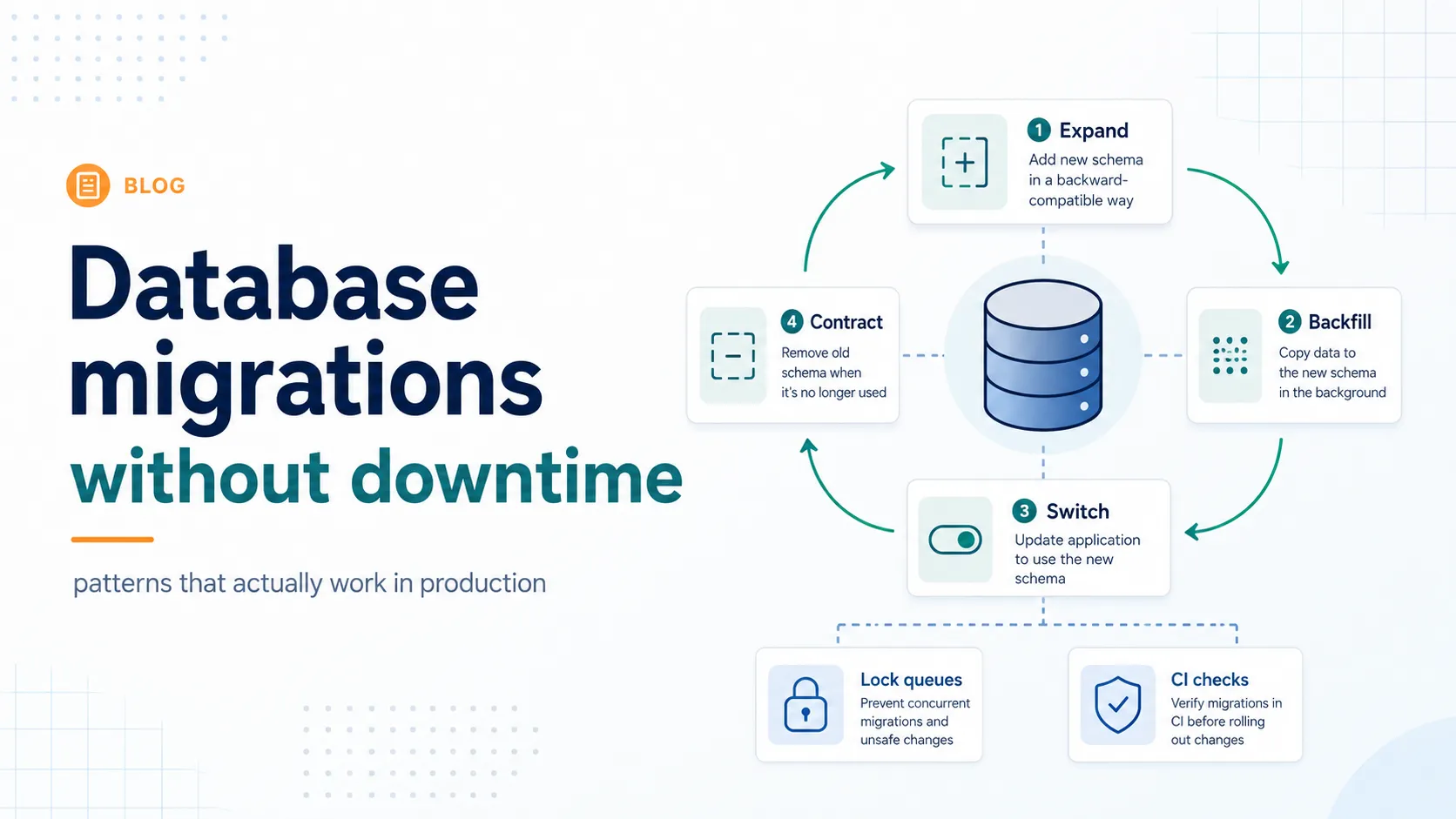
The core pattern, and the reason most of the rest of this article is short. You never change schema and code at the same time. Instead, you pass through a state where both the old and new shapes are valid, so any combination of old code and new schema - or new code and old schema - works.
  Deploy 1: EXPAND      add the new thing. Old code unaffected.
                        ↓
  Deploy 2: MIGRATE     new code writes both, reads old.
                        ↓
  Backfill              copy old → new, in batches, no lock.
                        ↓
  Deploy 3: SWITCH      new code reads new, still writes both.
                        ↓
  Deploy 4: CONTRACT    stop writing old. Drop it.

  Every arrow is independently deployable and independently reversible.
Four deploys instead of one. That is the cost, and it is the entire technique - each step is individually safe, and at no point does a rollback of the application require a rollback of the schema.
The recipes
Add a column
-- Safe. Since PostgreSQL 11, a non-volatile default does not rewrite the table.
ALTER TABLE orders ADD COLUMN channel text;
ALTER TABLE orders ADD COLUMN channel text DEFAULT 'web';

-- NOT safe: a volatile default must be evaluated per row, so it rewrites
ALTER TABLE orders ADD COLUMN token uuid DEFAULT gen_random_uuid();

-- Do that in three steps instead
ALTER TABLE orders ADD COLUMN token uuid;              -- instant
-- backfill in batches (below)
ALTER TABLE orders ALTER COLUMN token SET DEFAULT gen_random_uuid();Add NOT NULL to an existing column
SET NOT NULL scans the whole table under ACCESS EXCLUSIVE. The two-step version does the scan under a weak lock first.
-- 1. Add the check as NOT VALID. Instant - existing rows are not examined.
ALTER TABLE orders
  ADD CONSTRAINT orders_channel_not_null
  CHECK (channel IS NOT NULL) NOT VALID;

-- 2. Validate it. Scans the table under SHARE UPDATE EXCLUSIVE - traffic continues.
ALTER TABLE orders VALIDATE CONSTRAINT orders_channel_not_null;

-- 3. Now SET NOT NULL is cheap: since PG12 the planner uses the valid CHECK
--    to skip the scan. Brief ACCESS EXCLUSIVE only.
ALTER TABLE orders ALTER COLUMN channel SET NOT NULL;
ALTER TABLE orders DROP CONSTRAINT orders_channel_not_null;
NOT VALID means "enforce this for new rows, do not check existing ones yet". Every new write is constrained immediately; the expensive verification happens separately.Add an index
-- Never this on a live table: SHARE lock, blocks all writes for the build
CREATE INDEX orders_channel_idx ON orders (channel);

-- Always this: SHARE UPDATE EXCLUSIVE, writes continue
CREATE INDEX CONCURRENTLY orders_channel_idx ON orders (channel);

-- Cannot run inside a transaction block. Most migration tools wrap
-- statements in a transaction, so you must opt out explicitly.

-- If it fails it leaves an INVALID index behind. Check and clean up:
SELECT indexrelid::regclass FROM pg_index WHERE NOT indisvalid;
DROP INDEX CONCURRENTLY orders_channel_idx;
CONCURRENTLY takes roughly twice as long and makes two passes over the table. That is a good trade against blocking writes for the duration.Add a foreign key
-- 1. NOT VALID: instant, but enforced for all new and updated rows
ALTER TABLE orders
  ADD CONSTRAINT orders_customer_fk
  FOREIGN KEY (customer_id) REFERENCES customers(id) NOT VALID;

-- 2. Validate separately, under a weaker lock
ALTER TABLE orders VALIDATE CONSTRAINT orders_customer_fk;

-- And index the referencing column - PostgreSQL does not do this for you
CREATE INDEX CONCURRENTLY orders_customer_id_idx ON orders (customer_id);Rename a column
A rename is catalog-only and the lock is brief. The danger is not the lock - it is that every running instance of your application immediately breaks, because the column it queries no longer exists. Use expand and contract.
-- Deploy 1: add the new column
ALTER TABLE customers ADD COLUMN full_name text;

-- Deploy 2: application writes both columns, reads the old one
-- Backfill: UPDATE customers SET full_name = name WHERE full_name IS NULL;  (batched)
-- Deploy 3: application reads full_name, still writes both
-- Deploy 4: application stops writing name

ALTER TABLE customers DROP COLUMN name;Change a column type
Some are free, most rewrite the table. Widening a varchar length is metadata only. integer to bigint rewrites every row under ACCESS EXCLUSIVE - the classic primary-key-exhaustion migration that takes a large table offline for an hour.
-- Free: widening a length constraint
ALTER TABLE customers ALTER COLUMN name TYPE varchar(200);   -- from varchar(100)

-- Rewrites the whole table. Do not run this on a large live table.
ALTER TABLE orders ALTER COLUMN id TYPE bigint;

-- Expand and contract instead:
ALTER TABLE orders ADD COLUMN id_big bigint;
-- backfill in batches, keep in sync with a trigger, switch reads, then swap
BEGIN;
  ALTER TABLE orders RENAME COLUMN id TO id_old;
  ALTER TABLE orders RENAME COLUMN id_big TO id;
COMMIT; -- brief ACCESS EXCLUSIVE, metadata only-- Keep the shadow column current while you backfill
CREATE FUNCTION sync_id_big() RETURNS trigger AS $$
BEGIN
NEW.id_big := NEW.id;
RETURN NEW;
END;
$$ LANGUAGE plpgsql;
CREATE TRIGGER orders_sync_id_big
BEFORE INSERT OR UPDATE ON orders
FOR EACH ROW EXECUTE FUNCTION sync_id_big();SHARE ROW EXCLUSIVE - brief, but it does block writes momentarily, so it belongs in the lock-timeout retry loop like everything else.Add a unique constraint
-- 1. Build the index concurrently - the expensive part, no write blocking
CREATE UNIQUE INDEX CONCURRENTLY customers_email_uniq ON customers (email);

-- 2. Promote it to a constraint. Instant: it reuses the existing index.
ALTER TABLE customers
  ADD CONSTRAINT customers_email_key UNIQUE USING INDEX customers_email_uniq;
ADD CONSTRAINT ... UNIQUE on its own builds the index while holding ACCESS EXCLUSIVE. Building it separately and adopting it moves all the work outside the lock.Drop a column
DROP COLUMN is metadata-only and fast - PostgreSQL marks it dropped rather than rewriting the table. The risk is entirely deployment ordering: any instance still running the old code will error on its next query.
- Deploy code that no longer reads or writes the column, and wait for the rollout to complete.
- Confirm nothing references it - views, functions, triggers, materialised views, indexes, and any reporting tool outside your codebase.
- Wait long enough that a rollback to the previous release is no longer plausible. A day is reasonable; a release cycle is safer.
- Then drop it, with a lock timeout.
Quick reference
| Operation | Safe as written? | Approach |
|---|---|---|
ADD COLUMN (nullable, or constant default) | Yes | Just do it, with a lock timeout |
ADD COLUMN with a volatile default | No - rewrites | Add, backfill, then set the default |
DROP COLUMN | Yes, but deploy order matters | Remove from code first, wait, then drop |
ALTER COLUMN TYPE (widening varchar) | Yes | Metadata only |
ALTER COLUMN TYPE (int to bigint) | No - rewrites | Shadow column, trigger, backfill, swap |
SET NOT NULL | No - full scan | CHECK … NOT VALID, validate, then set |
CREATE INDEX | No - blocks writes | CONCURRENTLY |
ADD FOREIGN KEY | No - locks both tables | NOT VALID, then validate |
ADD CHECK | No - full scan | NOT VALID, then validate |
ADD UNIQUE | No - builds under lock | CREATE UNIQUE INDEX CONCURRENTLY, then adopt |
RENAME COLUMN | Lock is fine, code is not | Expand and contract |
DROP TABLE / TRUNCATE | Lock is fine, code is not | Same |
Backfilling large tables
A single UPDATE over ten million rows holds row locks for the whole statement, generates enormous WAL, blows out replication lag, and creates ten million dead tuples for vacuum to clean up. Batch it.
-- Batched, resumable, committed per chunk
DO $$
DECLARE
  batch_size int := 5000;
  updated    int;
BEGIN
  LOOP
    UPDATE orders SET channel = 'web'
    WHERE id IN (
      SELECT id FROM orders
      WHERE channel IS NULL
      ORDER BY id
      LIMIT batch_size
      FOR UPDATE SKIP LOCKED
    );

    GET DIAGNOSTICS updated = ROW_COUNT;
    EXIT WHEN updated = 0;

    COMMIT;              -- release locks, let vacuum work, let replicas catch up
    PERFORM pg_sleep(0.1);
  END LOOP;
END $$;
SKIP LOCKED avoids fighting with live traffic. The COMMIT per batch is what keeps locks short and lets autovacuum keep up. The sleep throttles WAL generation.- Run it outside the migration. A backfill is a background job, not a deploy step. A deploy that waits four hours for a backfill is a deploy nobody can roll back.
- Make it resumable and idempotent. The
WHERE channel IS NULLpredicate means rerunning it after a crash does the right thing. - Watch replication lag while it runs and slow down if it grows. This is the most common way a backfill causes a user-visible problem.
- Index the predicate - a partial index on
WHERE channel IS NULLkeeps each batch's lookup cheap as the remaining set shrinks. - Size batches by duration, not row count. Aim for each batch to take well under a second, and adjust as the table changes.
MySQL and InnoDB
The principles are identical; the mechanics differ. MySQL 8.0 can perform many alterations in place, and some instantly, and you should state which you expect rather than letting the server choose.
-- Instant: metadata only, no table copy (ADD COLUMN since 8.0.12)
ALTER TABLE orders ADD COLUMN channel varchar(32), ALGORITHM=INSTANT;

-- In place, concurrent DML permitted
ALTER TABLE orders ADD INDEX idx_channel (channel), ALGORITHM=INPLACE, LOCK=NONE;

-- If the server cannot honour the algorithm you asked for, it ERRORS
-- rather than silently falling back to a full table copy. That is the point.
ALTER TABLE orders MODIFY COLUMN total bigint, ALGORITHM=INSTANT;
-- ERROR 1845: ALGORITHM=INSTANT is not supported for this operationALGORITHM and LOCK explicitly. Failing loudly in review is far better than discovering in production that the server chose ALGORITHM=COPY.For alterations that cannot run in place, the established tools rebuild the table in the background and swap it in. gh-ost reads the binary log and needs no triggers, which makes it lighter on the source table and pausable mid-run. pt-online-schema-change uses triggers, is older and very widely deployed, and adds write overhead for the duration.
Deploy orchestration
Most migration failures are ordering failures rather than SQL failures. The question to ask for every change: during the rolling deploy, when old and new code run simultaneously, does every combination work?
| Change | Migration runs | Why |
|---|---|---|
| Additive - new column, new table, new index | Before the code deploy | Old code ignores what it does not know about |
| Destructive - drop column, drop table | After the code deploy, with a delay | Old code still queries it until the rollout finishes |
| Renames and type changes | Split across several deploys | There is no single safe moment |
| Backfills | Out of band entirely | Too slow to belong in a deploy |
- Never bundle a destructive migration with the code that stops using the thing. If the deploy is rolled back, the schema is not, and the previous version is now broken.
- Make migrations idempotent -
IF NOT EXISTS,IF EXISTS- so a rerun after a partial failure is safe. - One logical change per migration file. A file that adds a column and drops another cannot be partially rolled back.
- Prefer forward fixes to down migrations. Down migrations are rarely tested and often lose data. Write a new forward migration instead.
- Test against a production-sized copy. A migration that is instant on ten thousand rows tells you nothing about ten million.
- Deploy migrations separately from application code where your tooling allows it. Coupling them means the slowest step gates the fastest.
Catching this in review
Lock behaviour is exactly the kind of knowledge that lives in one engineer's head and leaves with them. Encode it in CI instead.
| Tool | What it does |
|---|---|
squawk | Lints PostgreSQL migration SQL for unsafe patterns; runs in CI with no database |
strong_migrations | Rails gem that blocks unsafe migrations at development time and explains the safe alternative |
atlas / bytebase | Schema-as-code with change analysis and policy enforcement |
gh-ost / pt-online-schema-change | Online schema change for MySQL tables that cannot be altered in place |
pgroll | Expand-and-contract as a managed workflow, with both schema versions live at once |
# In CI, before the migration ever reaches staging
npx squawk migrations/0042_add_channel.sql

# migrations/0042_add_channel.sql:3:1: warning: prefer-robust-stmts
#   Wrap statements in a transaction or add IF NOT EXISTS
# migrations/0042_add_channel.sql:7:1: warning: require-concurrent-index-creation
# Use CREATE INDEX CONCURRENTLY on existing tablesRollback, realistically
Schema changes are not symmetric with code changes, and pretending otherwise is how incidents get worse. Dropping a column is instant; recreating it does not bring the data back.
- Additive changes need no rollback. An unused column costs nothing. Leave it and clean up later.
- Destructive changes are irreversible. Treat the drop as a one-way door and delay it until a rollback to the previous release is genuinely off the table.
- Keep a window between deploy and contract. At least one full release cycle before you drop anything the previous version used.
- Rename to a tombstone before dropping, if you want a cheap safety net:
ALTER TABLE … RENAME COLUMN name TO name_deprecated_20260814. Reversible for as long as you keep it. - Have a restore path, not just a backup. Know how long a point-in-time recovery takes for your data volume, because that number is the real cost of getting a destructive migration wrong.
Mistakes that keep recurring
| Mistake | Consequence |
|---|---|
No lock_timeout | A queued migration blocks the whole table indefinitely |
CREATE INDEX without CONCURRENTLY | Writes blocked for the entire build |
ADD FOREIGN KEY without NOT VALID | Both tables locked while every row is checked |
SET NOT NULL directly on a large table | Full scan under ACCESS EXCLUSIVE |
| Renaming a column in one deploy | Every running instance breaks immediately |
| Dropping a column in the same deploy that stops using it | A rollback leaves the previous version broken |
| Backfilling in one statement | Replication lag, WAL flood, vacuum backlog |
| Testing only on a small development database | Every operation looks instant until it is not |
| Bundling several logical changes in one file | No partial rollback is possible |
| Assuming MySQL will pick a safe algorithm | A silent ALGORITHM=COPY on a large table |
| Forgetting views and functions referencing a renamed column | Errors that appear later, far from the migration |
| Migration running as part of application startup | Every instance races to run it during a rolling deploy |
Verdict
Zero-downtime migration is not a technique so much as a refusal to do two things at once. Do not change schema and code in the same step. Do not hold a strong lock and do expensive work in the same statement. Almost every safe pattern in this article is one of those two separations applied to a specific operation.
The mechanics follow from that. NOT VALID separates the constraint from the verification. CONCURRENTLY separates the index build from the write lock. Expand and contract separates the schema change from the code change. Batched backfills separate the work from the transaction.
Set a lock timeout on every migration and put a migration linter in CI. Those two changes prevent more incidents than any amount of careful review, because they work on the days nobody is being careful.
And test on real volume. The single most reliable predictor of a migration incident is that the change was only ever run against a development database with ten thousand rows, where every operation is instant and every lock is invisible.
Sources
- PostgreSQL explicit locking - the lock modes and the full conflict matrix
- PostgreSQL
ALTER TABLE- which forms rewrite the table and which do not - PostgreSQL
CREATE INDEX- theCONCURRENTLYcaveats, including invalid indexes - MySQL online DDL operations - the per-operation algorithm and locking table
- gh-ost - triggerless online schema migration for MySQL
- squawk - a linter for PostgreSQL migrations
- strong_migrations - unsafe migration detection, with the safe alternative for each